Showing posts with label Publishers. Show all posts

Tuesday, December 4, 2012

Last-Minute Google Affiliate Network Holiday Tips

As we’re nearly halfway through the holiday shopping season, online shoppers have come out in full force this year, with Black Friday online sales totalling $1B and Cyber Monday 2012 taking the crown as the biggest online shopping day ever, with nearly $2B in sales and 30% growth year over year. With a few weeks left in 2012, we wanted to pass along a few tips to help you make the most of your affiliate program and capture as many incremental holiday sales as possible.

Holiday Tips for Publishers


Holiday Tips for Advertisers

  • Be sure to tag and share your seasonal links for upcoming shopping days, including Green Monday (12/10), Christmas/Holiday (12/25), Boxing Day (12/26 - UK, Canada), Post holiday sales, January sale.
  • Review recommended publishers to find new publisher opportunities based on similar categories and revenue potential.
  • Check out our recently-launched reports which enable you to compare performance across different metrics and timeframes and see geography based click and conversion data.

It’s gearing up to be an exciting end to the holiday shopping season and we hope these tools and tips will help you take full advantage of your affiliate program from now into 2013!

Posted by:
J.J. Hirschle, Head of Google Affiliate Network

Monday, November 19, 2012

Searching for and sharing the best seasonal links

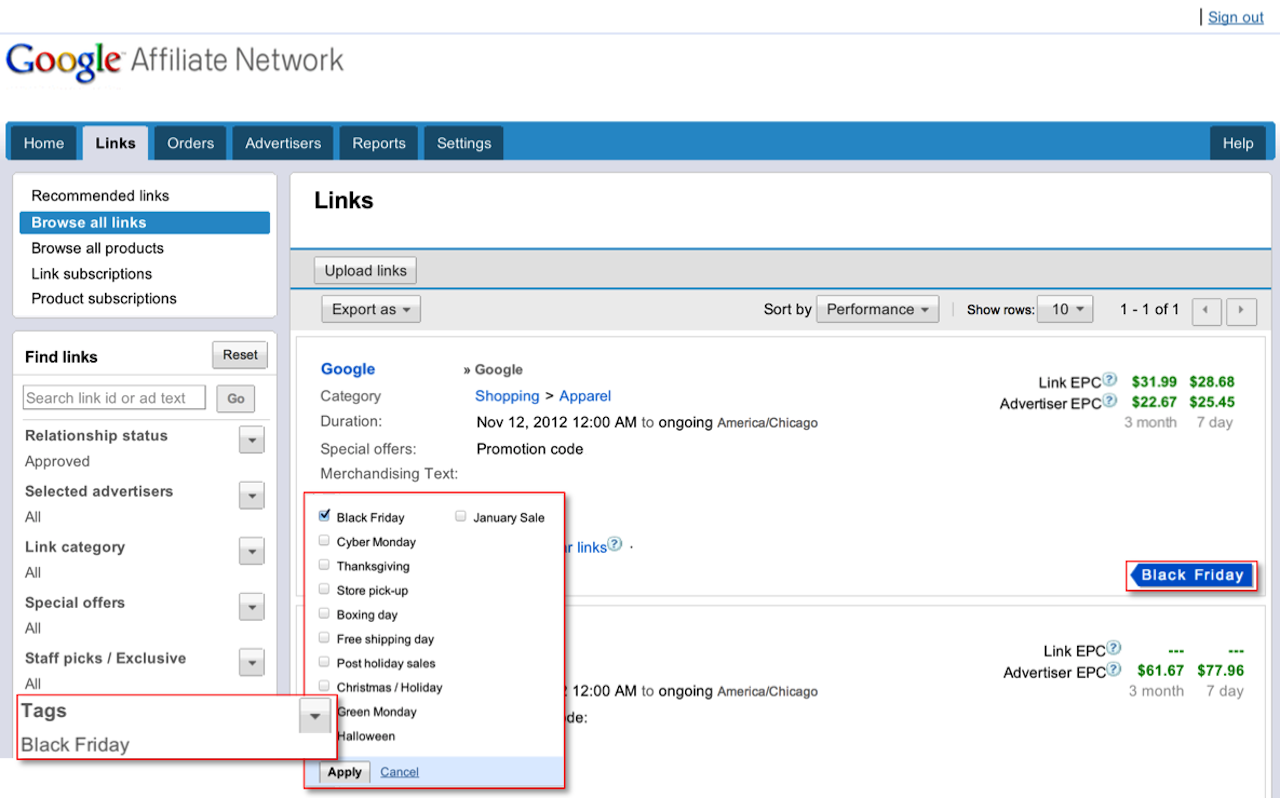
With the holiday season quickly approaching, the next few weeks are pivotal for driving sales through affiliate marketing. We’re excited to announce that we’ve made it even easier for publishers to quickly find and advertisers to easily share seasonal links through the Google Affiliate Network interface.

Finding seasonal links
If you're a publisher, you can now easily find seasonal links to promote -- just in time for the holiday rush. For example, click the link below to find available Black Friday links:

https://www.google.com/affiliatenetwork/viewlinks?atags=black_friday

This link will take you to the Links tab in your publisher account and automatically filter the results for links tagged for Black Friday. Advertisers are tagging additional links this week, so keep checking back to find the most updated list of Black Friday promotional links.

Advertisers have the capability of sharing these seasonal links with you directly via email. We hope this new feature, along with the structured promotions features launched earlier this month, helps you more quickly and easily find great advertiser offers.

Tagging and sharing seasonal links
If you're an advertiser, you'll find that it's now really easy to tag links and share them with publishers.

To add seasonal tags to your links, Click the 'Links' tab, then 'Browse all links'. Find the links you want to tag and check the box to the left of each link. Next, select the ‘Tag’ button at the top of the page, choose any appropriate seasonal tags, and click 'Apply'.


It's easy to share your newly-tagged links with publishers. Click ‘Share’ at the top of the page to get a link you can share with your joined publishers. Then, share the link via email with any publishers in your program so that they can easily view the seasonal links you just tagged.

On behalf of the engineering team, we want to wish you a happy holiday season. If there’s anything more we can do to help, please let us know in our Product forum.

Posted by:
Ali Pasha, Product Manager

Friday, November 16, 2012

Announcing the Notifications tab for publishers

Communication is a key component to Affiliate marketing, so it's no surprise that advertisers and publishers exchange a lot of email. With the peak shopping season coming up, it’s critical for publishers to stay informed of important advertiser program changes to make the most of their affiliate marketing efforts. To make it easier for publishers to keep track of important account notifications from within the Google Affiliate Network interface, we’ve launched a new Notifications system.

Types of notifications

If you're a publisher, starting today you’ll receive a notification whenever an advertiser makes a change to their account that impacts your relationship or commissions. For example, if an advertiser invites you to join their program, this invitation will appear in your notifications. You’ll also receive a notification when an advertiser makes a decision on your application to their program. Other examples of the notifications you’ll receive include Commission rate changes or updates to Advertiser Specific Terms.

From the Publisher Home, you’ll see a notification alert in the upper right corner of the interface that displays the number of pending messages. When you click on the alert, you can see more information along with a link to see all notifications.

When you click the Notifications tab, you'll see a basic summary and detailed view for each communication. You can search across notifications and advertisers so you can more easily review and act on affiliate-specific notifications while you’re working in your account.


This launch is the first of a series of enhancements to communications within the Google Affiliate Network interface. For a long time, we've listened to your feedback that adding a central communication hub could help increase efficiency and reduce the need to simply rely on your email inbox for important communications. Today's launch is the first step we're making towards this hub. Our vision is to move more communications into a central location in interface so you can better track and maintain your affiliate relationships and activities.

Send your feedback

We welcome your feedback. If you have any suggestions, let us know what you think by posting a comment here or in the Google Affiliate Network forum. Sign in to your account today to access the Notifications tab.

Posted by:
Joel Ingram, Software Engineer

Wednesday, November 7, 2012

Introducing new reporting enhancements

We made a few updates to our reports over the past few weeks which include features useful for both advertisers and publishers. These new reports include Order-level payment reports for publishers, Multi-metric reports for comparing performance across different metrics and timeframes, and Geography reports to help both advertisers and publishers understand more about where user clicks and conversions are coming from.

Order-level payment reports

With our new Order-level payment reports, publishers can easily see which conversions their accounts have received payment for. Order-level payment reports contain a comprehensive listing of conversions that show the month in which conversions were paid out.

Order level payments

When you view the report, you'll first see order-level payment information for your advertiser relationships from the month when you received payment. The report pulls this information based on the timeframe you specify, so you can access order-level payments from the past.

Multi-metric graph reports

Multi-metric graphs allow you to quickly see performance across two separate axes. Set the graphs to review metrics based on the previous week or previous year’s performance for a specified time frame to identify changes in performance. You can also review against specific metrics, such as Publisher fees, clicks, conversions, and more.


Geography reports

With Geography reports, you can gain insights into where user performance originates from, in most cases down to the state or province level. See performance volume by geographic region so you can optimize and refine your affiliate program. You can review geographic locations associated with clicks, actions, transactions, sales, and more.

To get started, select your desired metrics and time frame above the world map. All metrics will populate in the table below.


If you have feedback or suggestions on these new reporting features, let us know what you think by submitting feedback in the interface, or through our Product forum.

Posted by:
Kurt Spoerer, Product Manager

Tuesday, October 30, 2012

Holiday optimization tips for publishers

With the holidays quickly approaching, advertisers are trying to reach more customers. Now is the time to make the most of Google Affiliate Network – use the below insights and tips from our recent interface updates and optimization checklist to boost your performance this holiday season.

Update your publisher profile
Discover and apply to more advertiser programs
Get links and keep them fresh
  • Review Recommended links to see Staff picks and Exclusives.
  • Use automated services like Link subscriptions, Product subscriptions, and the Links API to easily keep links, special offers, promotions and products updated.
  • Get banner and dynamic links. The larger ad sizes for banner and dynamic links are more visual and easier for users to read and interact with.
  • If your site has an active user base and you’re driving a lot of conversions for an advertiser, ask them to create a co-branded landing page to help increase conversion.
Optimize your website
  • Make sure your website is updated for peak promotional seasons, and set aside inventory for Google Affiliate Network ads.
Track performance and take action on reporting insights
  • Use Creative reports to review link performance and find the top-performing creatives and links for your site.
  • Review your analytics to determine your most relevant content and top performing links.
  • Identify top-selling products through Product-related reports, then optimize for these products.
  • Order-level payment reports show you the list of orders that have been paid out in any given month.
Sign in to your publisher account today and take advantage of these optimization features. Cheers to a successful and productive holiday season!

Posted by:
Emily Harris, Product Marketing Manager

Wednesday, August 8, 2012

Recommending the most relevant advertisers, publishers, and links

Over the past year, we've heard from publishers and advertisers that they want a network that can help them create meaningful relationships. We've listened, and today, we've released a completely new recommendation engine that redefines how you can find and take advantage of affiliate marketing opportunities.

Publishers can find advertiser recommendations under the Advertisers > Recommended advertisers sub-tab. This is where they can find a list of available programs ranked based on relevancy and predicted performance. Each recommendation also shows why the recommendation was made, along with an estimate of earnings potential for that advertiser. We display advertiser recommendations based on the criteria below:
  • Similar category: Advertisers are ranked by relevancy to your publisher category.
  • Revenue potential: Advertisers are ranked primarily based on estimated payout fees.
In addition to the average advertiser EPC, each recommendation has an estimated advertiser EPC. Estimated EPC is a brand new metric designed to help publishers understand how much they could potentially earn with that advertiser.


Advertisers can now see publisher recommendations, too. Using the recommendation engine, the Publishers > Recommended publishers sub-tab shows a list of publishers that Google algorithms recommend as a good fit based on similar categories and revenue potential.


We've also brought the power of recommendations to the Links tab to help publishers find and promote the most relevant ads with the highest performance potential. Under the Links > Recommended links sub-tab, we display recommended text and banner links that Google algorithms predict may perform best for each individual publisher.


For more details, we suggest reviewing these Help Center articles:
Sign in to your account and try out recommendations. After you’ve taken a few minutes to review, we’d love to hear from you in our forum.

Posted by:
Ali Pasha, Product Manager
Robin Anil, Software Engineer

Monday, June 25, 2012

New enhancements to Google Affiliate Ads for Blogger

Back in April, we introduced Google Affiliate Ads for Blogger, a gadget that enables Blogger users to easily monetize their blogs through Google Affiliate Network and helps advertisers scale relationships with content blogs. We’ve received positive feedback about this gadget from participating advertisers and Blogger users, and wanted to let you know about a couple of recent enhancements we’ve made:


  • Additional advertisers: This program is now available to more advertisers. In order to participate, advertisers must provide a Merchant Center feed and consent through an email agreement.
  • Additional categories of blogs: All Blogger users located in the US with an AdSense account can now sign up for Google Affiliate Ads for Blogger. Participating advertisers can see performance at the category and blog level via the ‘Reports’ tab in the Google Affiliate Network interface.

Here are two examples of a Blogger user finding a relevant affiliate ad:


If you’re an advertiser interested in participating in Google Affiliate Ads for Blogger, please reach out to your Google Affiliate Network account team or submit an inquiry if you’re not already working with us. If you’re a publisher, learn more about posting affiliate ads to your blog.

Posted by:
Ali Pasha, Product Manager

Thursday, June 14, 2012

Announcing new UK advertisers

We’re excited to let you know that 30+ UK advertisers have recently launched affiliate programmes with Google Affiliate Network. For publishers with UK audiences, these programmes represent a new opportunity to earn incremental revenue for your website.

Just a few of our newly-launched advertisers include:

Follow these steps to apply to UK programmes:
  1. Log in to your account (or apply to join our network)
  2. Go to the Advertisers tab
  3. On the left-hand navigation, click 'Relationship status' and choose 'Available'
  4. Click ‘Countries’ and choose United Kingdom
  5. Apply to programmes

If you’re an advertiser interested in starting an affiliate programme with Google Affiliate Network, please contact us.

Posted by: Tony Nelan, Head of Google Affiliate Network for Europe

Monday, June 11, 2012

Connecting shoppers and great stores online

(Cross posted to the Official Google Blog)

Online shopping is great for many reasons, but most of all it’s a convenient and fast way to turn your intent to buy that new pair of running shoes, for example, into an actual purchase. But shoppers tell us they’re often nervous about buying from online stores they don’t know. We created the free Google Trusted Stores program to help solve this problem. When shoppers see the Google Trusted Store badge, they know in a snap they’re shopping with a reputable retailer and they can feel confident making an informed purchase.

We’ve been testing the program since last fall with about 50 online merchants and more than 10 million orders. It’s working even better than we hoped, generating positive feedback from shoppers and increasing sales for merchants. Starting today, Google Trusted Stores is open to all U.S. merchants who want to apply. 


Helping shoppers choose stores they can trust
When shopping online, you may come across the Google Trusted Store badge. Hover over it and you’ll see a “report card” which shows “grades” for that merchant’s shipping and service, including more precise metrics about what the grades mean. 
The Google Trusted Store badge and report card

This badge is only awarded to online stores that deliver a great overall experience, so even if you haven’t shopped with this merchant before, you can easily tell if they are trustworthy, ship quickly and reliably, and offer exceptional customer service. If there’s a problem with your purchase, we’re here to help. When you buy from a Google Trusted Store, you can opt in to get up to $1,000 lifetime purchase protection per shopper. And our dedicated customer service team is there to work with you and the merchant to assist in resolving the issue.

Helping merchants demonstrate their excellence and earn new business
Google Trusted Stores helps online stores attract new customers, increase sales and differentiate themselves by showing off their excellent service via the badge on their websites. Soon the badge will also appear on Google.com ads and in Google Shopping results.


Google Trusted Store badge on AdWords

Over the last nine months of the pilot, our tests show that participating in this program can help merchants big and small. For example, Wayfair, the largest online-only retailer of home goods and one of the top 50 largest online retailers as ranked by Internet Retailer, increased sales* on its site by 2.3 percent with Google Trusted Stores. And Beau-coup, a specialty online favors and gifts retailer, saw an 8.6 percent increase*. Take a look at our merchant success stories to learn more about how Google Trusted Stores has had a positive impact on website conversion rates and average order sizes for online retailers. 

Google Trusted Stores is entirely free, both for shoppers and for online stores. We’re still testing the most helpful ways to display Trusted Stores information to shoppers, so you may see different versions, or none at all, while we conduct experiments. If you’re a merchant and would like to participate in the Google Trusted Stores program, please apply. 


*Increased sales percentages are based on a combination of uplift in conversion and average order size.

Tuesday, November 30, 2010

Affiliate Exclusive Holiday Offers from Select Google Affiliate Network Advertisers

Google Affiliate Network is pleased to announce affiliate exclusive holiday offers from select Google Affiliate Network advertisers. The special offers will be available for Monday, December 13th, one of the busiest e-commerce days of the year. Offers will be live and valid only on December 13th.

Any Google Affiliate Network publisher who has a relationship with the participating advertisers will have access to these exclusive offers. If you are not currently a publisher in Google Affiliate Network but would like access to these exclusive offers, sign up today with your AdSense Publisher ID.

Participating Advertisers:

Below please find the advertisers, offers and application links to the advertiser’s Google Affiliate Network program.


New customers receive 25% off all personal products

Apply Now
LG Electronics 50" 1080p 600Hz Plasma. Now $766 Free Shipping*

Apply Now

*Additional exclusive offers available, search for “December 13 Offer” links on Dec. 13.
$5 off $50 or more

Apply Now
30% off your entire order

Apply Now
Free Shipping on all orders

Apply Now
$10 Off orders of $50 or more

Apply Now
16% off one item on December 13th

Apply Now
30% off Xenon Double Puck Light Kit

Apply Now
One Day Only SAVE 25% on Gourmet Gifts and Baskets (min $29)

Apply Now
$20 off $100+

Apply Now
Zenith 50" Plasma HDTV $565.99, save $134

Apply Now
10% of $100+

Apply Now
Save 20% on Personalized Gifts

Apply Now
Save 20% on Flowers and Gifts $39.99 or more

Apply Now
Free hat/cap with any regular-priced footwear purchase

Apply Now
Save 15% on Unique and Personalized Gifts at RedEnvelope

Apply Now
15% off $100 plus Free Shipping from Road Runner Sports

Apply Now
Sharp 46" LED HDTV $849.99

Apply Now
SAVE 25% on Hand-Dipped Berries and Gifts (min $29)

Apply Now
$10 Off All Orders

Apply Now
$15 off orders of $150 or more

Apply Now
Save 20% off The Thomas Kinkade Santa’s Workshop Bouquet

Apply Now
30% off your entire order

Apply Now
Free Shipping on all orders

Apply Now
Mug Mondays - 40% off mugs and magnets

Apply Now

Tracking links will be available on December 6th via the Google Affiliate Network platform in the Announcements section within the Home tab.

The offers will not be live or valid until December 13th and all offers will expire at midnight. Affiliates may not post offers until December 13th.


Further questions? Check out our Help Center for answers to frequently asked questions OR feel free to contact us with any questions.

Posted by Mari Condon, Google Affiliate Network Publisher Team

Monday, November 22, 2010

Opportunity Center for Publishers (Beta)

We’ve just released a new feature that automates the process of finding new advertiser programs. The Publisher Opportunities Center generates a list of recommended advertisers that have the best potential to generate conversions from your website traffic. Recommendations are based on internal data including publisher-advertiser category matches and the advertiser’s performance with your peers.

All Google Affiliate Network publishers can visit the new Opportunities beta tab after signing in to Google Affiliate Network. If we have adequate information on your website, the list of recommendations will be available immediately. From this screen you can view information about the recommended advertisers such as program-wide 3 month and 7 day Earnings Per 100 Clicks (EPC), a standard logo banner, primary category, links to the commission information and program terms, as well as a simple click to join button. You can also export this list as a CSV or TXT file. Note: You’ll also see a link to ‘Dismiss’ a recommendation if you’re not interested in a particular advertiser. Once you ‘Dismiss’ the advertiser listing, it is permanently removed from the Opportunities tab.

If you don’t see any recommendations it means we need more information about your website. You will be prompted to fill out a short form. Recommendations will be quickly generated based on your response.

Results will be updated daily, so publishers are encouraged to check their recommendations on a regular basis.

We will continue to iterate on the beta and we invite you to provide your feedback in our Help Forum.

On behalf of the Google Affiliate Network team.

posted by Sheila Parker, Product Manager

Thursday, May 14, 2009

Searching for Publisher Opportunities?

We just updated a new feature for advertisers that should benefit both our advertisers and publishers.  Advertisers can now view lists that highlight high performing publishers that are either underperforming for the advertiser, or have not joined the advertiser's program.

Advertisers:

    My network displays a list of publishers that are doing better on a relative basis in your category than they are for you.

    Rest of network displays a list of publishers that are not in your program that have a history of performance in your category.
  
If you are looking for a way to improve the productivity of your affiliate program, this is a great place to start.  The feature can be found by navigating to Publishers > Opportunities.
  
Publishers:

    In order to be visible to advertisers looking for new publishers, you must opt in to not joined opportunities on your communication preferences page.  To be visible to your existing advertisers that may be looking to expand their relationship with you, opt in to receive promotional communication for each advertiser to which you want to appear.

On behalf of the affiliate team,
Larry Adams

Monday, November 17, 2008

Google Ad Planner Data Now Available in Google Affiliate Network


This weekend we introduced new site profile links in our interface to provide users with better information about the traffic profiles of their marketing partners. Advertiser and publisher users will now see "Site Profile" links in a variety of locations in our interface. Advertisers can view them from their list of approved publishers or from any individual publishers account profile. Publishers may view this information on their not joined, approved pages as well as in the interface to retrieve links (ads).

The links will produce an overlay containing data provided by Google AdPlanner. The profile contains information on unique visitors, page views and visitor demographic profiles; data may not be available for sites with smaller audiences. For more information on Ad Planner, please visit their support site.

Larry Adams
Product Manager

Monday, October 13, 2008

New Google Affiliate Network Features: Data Feed UI, Link Subscriptions and Batch Creative Uploads

We deployed some new features over the weekend that we hope will help our users manage some important day to day tasks.

Product data feed setup in the UI

Publishers can now sign up for data feeds from through our user interface by navigating to 'Get Links > Product Feeds.' The page will be populated with your approved advertisers that offer a data feed, establishes a file naming convention for all of the feeds the you select to receive from Google advertisers and validates your FTP information. If you have previously set up feeds via our support team your existing settings have not changed, but any settings you adjust in the interface will override previous settings.

Link Subscriptions (formerly known as OrangeLinks)

We've also made a minor name change to our service that delivers feeds of promotional data to publishers. OrangeLinks will now appear in the interface as Link Subscriptions. The functionality has not changed; publishers who sign up for link subscriptions receive a daily file of new ads that their approved advertisers have created in the system. If you are already signed up, you should be aware that the filename format will be changing to "Link Subscriptions_MMDDYYYY.xls". If you haven't signed up, you should navigate to 'Get Links > Link Subscriptions' to get started; many publishers use this feature to quickly review every promotion their advertisers offer.

Batch Creative Upload

Advertisers may now upload creative assets in large batches. Loading creatives one by one is time consuming so we've added a feature to creative management that allows advertisers to upload zip files containing multiple creatives. We expect this will be a huge time saver in the busy Q4 season for many of our users.

Help Center

In case you missed it, we recently announced that we've launched a new help center. There is a lot of great content in there and we'll be adding more in the future. If you haven't checked it out yet, please take a minute to browse the advertiser and publisher docs.

Regards,

Larry Adams
Product Manager