Showing posts with label Product Releases. Show all posts

Monday, November 19, 2012

Searching for and sharing the best seasonal links

With the holiday season quickly approaching, the next few weeks are pivotal for driving sales through affiliate marketing. We’re excited to announce that we’ve made it even easier for publishers to quickly find and advertisers to easily share seasonal links through the Google Affiliate Network interface.

Finding seasonal links
If you're a publisher, you can now easily find seasonal links to promote -- just in time for the holiday rush. For example, click the link below to find available Black Friday links:

https://www.google.com/affiliatenetwork/viewlinks?atags=black_friday

This link will take you to the Links tab in your publisher account and automatically filter the results for links tagged for Black Friday. Advertisers are tagging additional links this week, so keep checking back to find the most updated list of Black Friday promotional links.
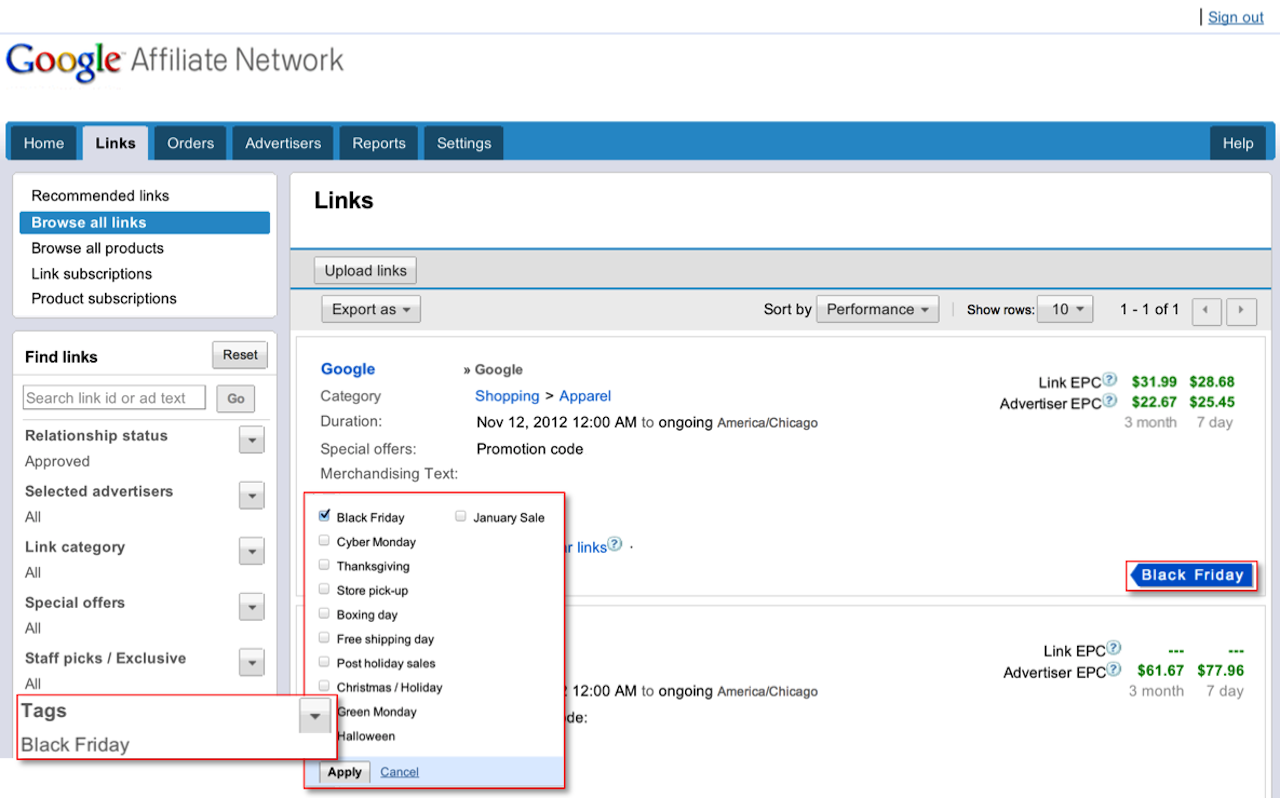
Advertisers have the capability of sharing these seasonal links with you directly via email. We hope this new feature, along with the structured promotions features launched earlier this month, helps you more quickly and easily find great advertiser offers.

Tagging and sharing seasonal links
If you're an advertiser, you'll find that it's now really easy to tag links and share them with publishers.

To add seasonal tags to your links, Click the 'Links' tab, then 'Browse all links'. Find the links you want to tag and check the box to the left of each link. Next, select the ‘Tag’ button at the top of the page, choose any appropriate seasonal tags, and click 'Apply'.


It's easy to share your newly-tagged links with publishers. Click ‘Share’ at the top of the page to get a link you can share with your joined publishers. Then, share the link via email with any publishers in your program so that they can easily view the seasonal links you just tagged.

On behalf of the engineering team, we want to wish you a happy holiday season. If there’s anything more we can do to help, please let us know in our Product forum.

Posted by:
Ali Pasha, Product Manager

Wednesday, November 7, 2012

Introducing new reporting enhancements

We made a few updates to our reports over the past few weeks which include features useful for both advertisers and publishers. These new reports include Order-level payment reports for publishers, Multi-metric reports for comparing performance across different metrics and timeframes, and Geography reports to help both advertisers and publishers understand more about where user clicks and conversions are coming from.

Order-level payment reports

With our new Order-level payment reports, publishers can easily see which conversions their accounts have received payment for. Order-level payment reports contain a comprehensive listing of conversions that show the month in which conversions were paid out.

Order level payments

When you view the report, you'll first see order-level payment information for your advertiser relationships from the month when you received payment. The report pulls this information based on the timeframe you specify, so you can access order-level payments from the past.

Multi-metric graph reports

Multi-metric graphs allow you to quickly see performance across two separate axes. Set the graphs to review metrics based on the previous week or previous year’s performance for a specified time frame to identify changes in performance. You can also review against specific metrics, such as Publisher fees, clicks, conversions, and more.


Geography reports

With Geography reports, you can gain insights into where user performance originates from, in most cases down to the state or province level. See performance volume by geographic region so you can optimize and refine your affiliate program. You can review geographic locations associated with clicks, actions, transactions, sales, and more.

To get started, select your desired metrics and time frame above the world map. All metrics will populate in the table below.


If you have feedback or suggestions on these new reporting features, let us know what you think by submitting feedback in the interface, or through our Product forum.

Posted by:
Kurt Spoerer, Product Manager

Thursday, November 1, 2012

Introducing structured promotional data for links

It’s no secret that special promotions and coupons are integral to the affiliate channel. If you're a publisher with a shopping-focused website, you know how important it is to present accurate, comprehensive promotions and coupons to your visitors.

Today, we're happy to announce a more structured way to get links with offers, promotion codes, and discounts so you can more easily automate and display the latest advertiser promotions. You now have the ability to search and filter by special offers, promotion codes, and discounts – including Link templates and Publisher-specific links. Read on to learn more about how you can now access structured promotion data.

Accessing links with structured promotional data

When you search the interface, you can perform queries that weren't previously possible. For example, try searching search for an Apparel link with Free shipping that has a Promotion code where the discount is greater than 25 percent off. This could be helpful if you have a website where you only want to promote coupons with a significant discount.


We’ve also updated the recommendation engine to help you find more relevant promotional links. If you're a shopping-focused publisher, you'll see that links with special offers, promotion codes, or discounts are more visible.

Links API

Structured link data is also available through the Google Affiliate Network API, so you can programmatically access and display offers, promotion codes, and discounts to your website in real time.

Link subscriptions

You can also get links with special offers, promotion codes, and discounts via Link subscriptions. To access structured link data through Link subscriptions, sign in to your publisher account and upgrade to Link subscriptions Version 2.


Send us your feedback

As always, your feedback is very important. You can click on “Details inaccurate?” in the interface to provide feedback at the link level to help us quickly resolve any potential issues.

If you have feedback or suggestions, let us know what you think by posting a comment here or in the Google Affiliate Network forum.

We’ve worked hard to make these changes to help you achieve greater success this holiday season. Sign in to your account today to access these new link features!

Posted by:
Ali Pasha, Product Manager

Thursday, October 25, 2012

Introducing the Manage Inquiries tab for advertisers

Many savvy shoppers shop online through loyalty and reward programs, since their purchases can lead to incentives like miles, points, or other reward-based currencies (typically referred to as a passback).

As an advertiser, you know how important it is to make sure customers are satisfied with their purchases. If they shop through loyalty programs, you also know how it’s important that they receive their passback. To that end, you may sometimes be contacted by loyalty publishers' customer service teams asking to confirm orders for customers who may not have received their passback. To ease this process, we've released the new Manage Inquiries tab to streamline the order lookup and resolution process so you can quickly review and take action on inquiries.


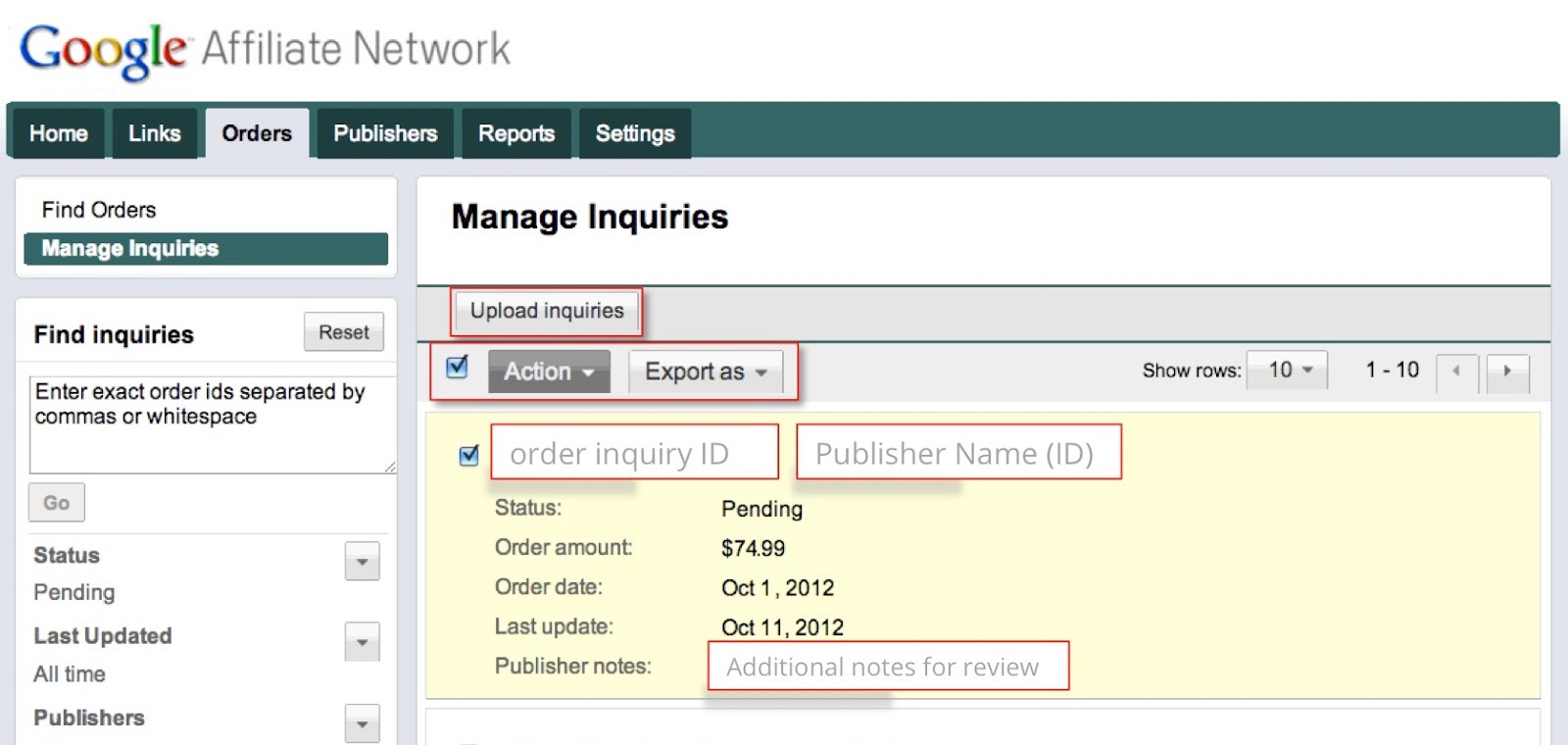
The Manage Inquiries tab shows all pending order inquiries, and publishers also have the option to provide notes to help you research and take action on the inquiry. You’ll also receive a weekly notification email if a publisher has added an inquiry to your account.

Reviewing inquiries
You can start reviewing inquiries by taking the following steps:
  1. Click on the Orders tab, then the Manage Inquiries sub-tab.
  2. Review the list of Pending inquiries.
  3. Review your own reporting to decide whether or not the inquiry is already associated with a valid order.
  4. Click on the Action drop-down and take the appropriate action on the inquiry. You can select the order and approve it as-is, or edit the order amount and approve, or decline the inquiry. You can also use the “select all” function to take action on multiple inquiries at once.
If you have a large number of inquiries, you can save time by exporting them to .csv, specifying the actions in the file and uploading it to the interface.

Learn more about managing pending order inquiries in the Help Center.

Posted by:

Gabe Black, Software Engineer
Mark St. John, Software Engineer

Wednesday, October 24, 2012

Quickly create links with our new Chrome extension for publishers

If you're an affiliate publisher, you might be looking for the most efficient ways to promote great products. With this in mind, we’re happy to announce the Google Affiliate Network Link Builder, a new Chrome extension that makes creating product links fast and easy.

Publishers have long been able to create links by signing into Google Affiliate Network and creating a Publisher-specific link (PSL). Now, the Google Affiliate Network Link Builder enables publishers to create affiliate ads that link directly to unique product pages -- right from an advertiser’s website.

If a great product catches your eye while browsing, why shouldn't a PSL be anything more than a click away? With our new Chrome extension, it isn’t. The extension displays a button in the corner of your browser window. If the advertiser's program supports deep linking, you can easily create a PSL for any product you’re viewing by clicking the button.


Get started

To start using the Link Builder, just follow these steps:
  1. Sign in to Chrome with your Google Affiliate Network publisher login and password. Here’s a step-by-step process for signing in to Chrome.
  2. Visit the Chrome Web Store and download the Google Affiliate Network Link Builder. This will add the icon to your browser.
  3. Next, visit an advertiser website where you have an existing affiliate relationship and search for a product.
  4. Found a cool product? Use the extension by clicking on the icon and a pop-up window will prompt you to create a PSL with one click.
  5. And that’s it! Copy the PSL, and you can begin promoting it right away.

How it works

The extension works entirely by making calls to Google Affiliate Network’s public API, and the only requirement is that you be signed in to Chrome with your publisher account. Once loaded, the extension downloads all your advertiser relationships into memory and then recognizes when you have an affiliate relationship with a website you’re visiting. The extension's open source code is available for all to see, as an example of how to use Google Affiliate Network's public APIs.

We encourage our users to study and use the code to support their creative endeavors. If you have questions or feedback, please let us know in our public support forum.

Posted by:
Ben Collins-Sussman, Engineering Manager

Monday, September 17, 2012

Google Affiliate Ads for Blogger now in the UK!

Earlier this year, we launched Google Affiliate Ads for Blogger in the US and added new enhancements in June. The positive results and feedback we’ve received are very promising, and we’re excited to announce that this gadget is now available to Blogger users in the UK!

To refresh your memory, Google Affiliate Ads for Blogger is a gadget that makes it easy for Blogger users to insert an affiliate ad into a blog post and earn a commission when someone clicks the link and makes a purchase on the advertiser’s site.

Watch the video below for a quick refresher:


Here’s how to get started:
  1. If you’re a Blogger user in the UK (or the US), go to the Earnings tab in Blogger and sign up for AdSense if you don’t already have an account.
  2. Once you have an AdSense account, you may see the Google Affiliate Ads for Blogger gadget when you write a new blog post.*
  3. Write a new post and select a relevant affiliate ad from the 'Advertise Products' gadget.
  4. Publish your post, and voilà! You may earn a commission when someone clicks your affiliate ad and makes a purchase.

Participating UK advertisers:
Advertisers including Bestbathrooms.com, Cheapsuites.co.uk, Crooked Tongues, Diamond Manufacturers, eFlorist, Hudsonreed.com, Perfume Click and The Snugg have already come on board, and more are joining every day.

If you’re an advertiser interested in participating in Google Affiliate Ads for Blogger, please reach out to your Google Affiliate Network account team or contact us if you’re not already working with us.

Posted by:
Erica Sievert, Product Marketing Manager


*Note that this gadget will only be available to select UK and US Blogger users whose blogs match available ad categories, so you may not immediately see the gadget even if you have an AdSense account.

Your use of the Google Affiliate Ads for Blogger program is governed by the Google Affiliate Ads For Blogger Online Program Terms and Conditions. Please review the Office of Fair Trading's Q&A that discusses a blogger's obligation to disclose financial benefits you may receive for endorsing products or services. As a reminder, under your Google Affiliate Ads For Blogger Online Program Terms and Conditions, You must comply with all applicable laws relating to the disclosure of financial benefits You receive for endorsing any products or services.  For example, when you include a Blogger Affiliate Ad on Your blog, you will clearly identify, in a manner prominently displayed with editorial content on your blog such that it would be unavoidable to the average user, that the Blogger Affiliate Ad is an advertisement.

Thursday, September 6, 2012

Creating better relationships and improving productivity

We’ve been amazed at the adoption of the recommendation engine, a new tool that helps advertisers and publishers find new relationships and links based on relevance and revenue potential. Google Affiliate Network now sees over half of all new relationships being created from our recommendations. Today, we’re excited to share new enhancements that further simplify the process of creating relationships and getting links.

For publishers:

Creating relationships
The Advertisers tab includes three sub-tabs to help you easily sort through new opportunities.


  • Recommended is now the default view for the Advertisers tab, featuring a customizable list of available advertiser programs that Google algorithms predict may be a good fit for you.
  • Invitations are from advertisers that want to work with you -- including those with private programs. To join, just click the ‘Join’ button for that invitation.
  • Browse existing shows the status of advertiser programs you’ve already applied to.
Getting the best links
The Links tab features recommendations for links that we estimate will perform well for you, and we now include new criteria for recommendations, like Staff picks and Exclusive opportunities. You can still view ‘Browse all links’ to search for links as normal. You'll also notice three new sub-tabs – we've consolidated Products and Subscriptions under the Links tab.


  • Recommended links are ranked primarily based on average earnings.
  • Staff picks are curated by Google Affiliate Network account teams based on relevant performance or seasonality.
  • Exclusive opportunities feature links only available through Google Affiliate Network.
For advertisers:

Creating relationships
The Publishers tab includes three sub-tabs to help you easily sort through high-potential publishers that may be a good fit for your program.


  • Recommended is now the default view for the Publishers tab. New search filters enable you to quickly narrow down the list of publishers that are a good fit.
  • Pending makes it easy for you to review publishers and quickly approve them in bulk. We sort publishers by relevance to help you approve the best recommendations first.
  • Browse existing shows the status of publishers that you’ve already taken action on, as well as any non-joined publishers you can recruit.
Please let us know what you think by posting a comment here or in the Google Affiliate Network forum.

Posted by:
Ali Pasha, Product Manager
Robin Anil, Software Engineer

Thursday, August 23, 2012

Introducing the Links API

Since we launched our first set of API’s, we've consistently heard from publishers that they want an automated, flexible way to access and serve affiliate ads to scale their marketing efforts, create more unique advertising experiences, and better monetize their websites. Today, we've launched a beta of the new Links API, enabling publishers to query for links, banners, and even create publisher-specific links in real time.

If you're using our existing API's or are looking for more advanced ways to distribute affiliate links, try our Links API to programmatically access and show ads from Google Affiliate Network advertisers in new and creative ways. To get started, take a look at the documentation.

To start testing now, try out the Links API in Google APIs Explorer. Try running some sample requests like listing available free shipping promotions from approved advertisers (requires authentication).

Want to learn more about using Google Affiliate Network APIs to their full potential? Check out our presentation at Google I/O:


As always, we’d love to hear from you. If you have comments or suggestions on our new Links API, please visit our forum and share your feedback.

Posted by:
Ali Pasha, Product Manager
Shaun Cox, Software Engineer

Wednesday, April 18, 2012

Introducing Google Affiliate Ads for Blogger

Blogger is a free tool that enables anyone to publish a blog and have a voice on the web. When people share words, thoughts and photos on their blogs, they’re sharing their passions with the world. Here at Google Affiliate Network, we see that many of our publishers use Blogger, and often times they’re passionate about brands or products that  they believe in. We’re excited to announce that starting today, a new gadget called Google Affiliate Ads for Blogger will be available to select U.S. Blogger users. This gadget makes it easy for Blogger users to insert an affiliate ad into a blog post and earn a commission when someone clicks the link and makes a purchase on the advertiser’s site.  Watch the video below for a quick preview:


Here’s how to get started:
If you’re a Blogger user, go to the Earnings tab on Blogger and sign up for AdSense if you don’t already have an account.


Once you have an AdSense account, you may see the Google Affiliate Ads for Blogger gadget when you write a new blog post. Note that this gadget will only be available to select U.S. Blogger users whose blogs match available ad categories, so you may not immediately see the gadget even if you have an AdSense account. We’ll be sure to let you know when we expand this program to more Blogger users.

When you write a new post, you can select a relevant affiliate ad from the “Advertise Products” gadget to the right of the post editor. The ad can be a text link, a product image, or a banner. 


Publish your post, and voilà! You may earn a commission when someone clicks your affiliate ad and makes a purchase.

We’re incredibly excited to make it easier for Blogger users to extend your influential relationship with your audiences by promoting the products you love. By providing an additional way to earn revenue, we want to help you keep doing what you love -- blogging.

Get started today by visiting the Google Affiliate Ads for Blogger website.

Posted by:
Ali Pasha, Product Manager

Note: The Google Affiliate Ads for Blogger gadget is currently only available through Blogger. We’re working to make this gadget available to Google Affiliate Network publishers through the Google Affiliate Network interface, and will be sure to let you know when this option is available. If you're an advertiser interested in participating, please contact your Google Affiliate Network representative or submit an inquiry if you’re not already working with Google Affiliate Network.